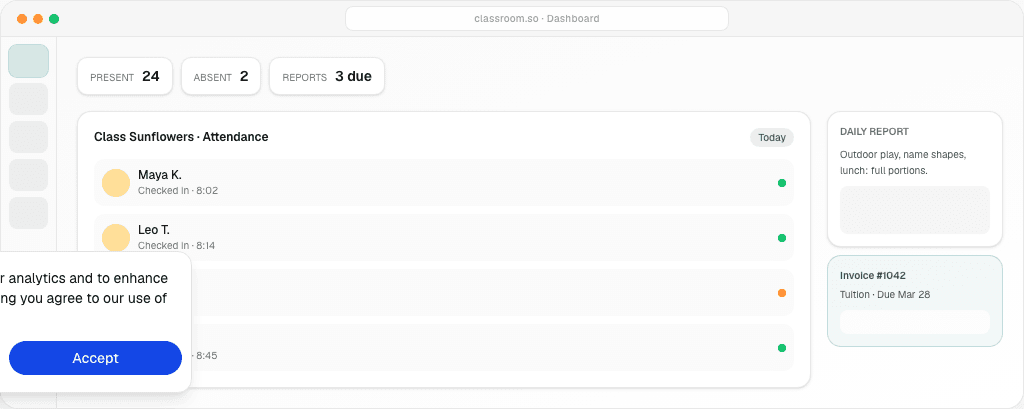

Childcare management software is a digital platform that helps preschools, daycares, and early learning centres run attendance, billing, daily reports, and parent communication from one place—instead of spreadsheets, WhatsApp groups, and paper forms.
It is 7:45 a.m. Parents are arriving. One child is absent, but nobody updated the register. A teacher is typing the same daily report into three WhatsApp groups. Your admin is chasing a parent for last month's fees. A paper consent form sits unsigned on the counter.
If this sounds familiar, you are not failing at your job. You are running a childcare centre with tools that were never built for the work. Spreadsheets, messaging apps, and paper folders work for a small program. They break down when enrolment grows, staff changes, or a parent asks to see their child's day in one place.
Preschool directors and daycare owners in Malaysia, Singapore, and beyond use a childcare management system to cut admin chaos. Families get a modern experience too.
This guide covers what childcare management software is, which features matter, how to choose a system, and what to look for when comparing Brightwheel, HiMama, LittleLives, and Oodlins.

Ready to see it in action? Start your free trial
What Is Childcare Management Software?
Childcare management software — also called a childcare management system or early childhood management software — is built for preschools, daycares, kindergartens, and early learning centres. It replaces scattered tools with one place to run daily work.
The software handles the tasks that eat your team's time:
- Recording who is present, absent, or late
- Sharing daily updates with parents
- Sending invoices and tracking payments
- Storing child records, emergency contacts, and medical notes
- Talking with families without personal messaging apps
Preschool management software follows the rhythm of a centre: drop-off, pick-up, naps, meals, learning time, and keeping parents informed.
A modern preschool management system works on phones and tablets. Teachers can log attendance at the door and send a photo to parents before lunch. They do not need to walk back to the office.
Key Features to Look for in Childcare Management Software
Not every platform offers the same depth. When you review daycare management software or preschool management software, focus on what your team uses every day. Ignore long checklists of features you will never touch.
Attendance and Check-In
Good childcare attendance software is the base of centre operations. Look for:
- Quick check-in and check-out at drop-off and pick-up
- Digital sign-in with time stamps
- Absence and late arrival tracking
- Approved pickup person checks
- Live headcount for each classroom
Accurate attendance feeds ratios, billing, and compliance reports. If check-in is slow or wrong, your whole day starts badly.

Daily Reports and Parent Updates
Parents want to know their child ate, slept, and had a good day. A strong system lets teachers log:
- Meals and snacks
- Nap times
- Toilet and diaper changes
- Mood and behaviour notes
- Learning activities and milestones
- Photos and short notes
Daily reports should reach parents on their own — through a parent teacher communication app or portal. Teachers should not copy the same update into three chat groups. The best platforms are fast enough that teachers log updates during the day, not after hours.

Billing and Invoicing
Fee collection is where many centres lose time and money. Preschool billing software should handle:
- Recurring monthly or term-based invoices
- Per-child fee plans (full-day, half-day, extended care)
- Late payment reminders
- Payment tracking and receipt history
- Local payment methods where available
Daycare payment software linked to enrolment data saves hours of manual work. When a child leaves or changes schedule, the invoice should update. You should not need a spreadsheet fix.
See Classroom pricing for per-enrolled-child plans with no setup fee.
Parent Communication Portal
A parent portal gives families one place to:
- Read daily reports and announcements
- View invoices and payment history
- Update emergency contacts and medical info
- Message teachers or centre admin
- See photos and activity updates
This replaces the mix of WhatsApp, email, and printed notices. Some parents always get left out. Clear communication builds trust. Trust drives enrolment and retention.
Multi-Branch Management
If you run more than one site — or plan to — look for childcare management software with multi-branch support. You should be able to:
- View attendance and enrolment across all sites from one dashboard
- Manage staff access by location
- Compare performance between branches
- Apply the same policies with local flexibility
Centre groups in Southeast Asia often start with one site and grow fast. Your software should grow with you. You should not need a painful migration later.
AI Assistant
An AI assistant in your childcare management system can help directors and teachers:
- Draft parent announcements from a short brief
- Summarise weekly activity for a classroom
- Answer common admin questions without digging through menus
- Suggest wording for incident reports or sensitive messages
AI-native platforms like Classroom treat this as a daily tool, not a sales gimmick. Busy centre owners who write the same messages every week save real time.
Benefits of Childcare Management Software
The right platform does more than replace paper forms. It changes how your centre runs and how families feel about you.
Save Hours Every Week on Admin
Directors and office staff often spend a large share of the week on tasks software handles in minutes—copying attendance into spreadsheets, typing invoices, chasing forms, and answering “Did my child eat lunch?” messages. Centres that consolidate those workflows typically report reclaiming several hours per week for classroom support and family conversations.
When attendance, billing, and communication live in one system, you enter data once. It flows where it needs to go. That time goes back to supporting teachers, visiting classrooms, and talking to new families.
Improve Parent Satisfaction and Retention
Parents compare your centre to every app they use — banking, food delivery, school portals. When daily updates arrive on time and invoices are clear, families notice.
Centres that respond fast and share real updates get fewer complaints and more referrals. A parent teacher communication app that parents enjoy using is a real edge over competitors.
Gain Control Over Revenue and Enrolment
Preschool billing software linked to attendance and enrolment shows you:
- Who has paid and who has not
- Which programs are full
- How fee changes affect monthly revenue
- When families tend to leave or enrol
You stop finding payment gaps at month-end. You make decisions from live numbers — whether you run one classroom or ten branches.
How to Choose the Right Childcare Management Software
Choosing the best preschool software is not about the longest feature list. It is about fit — your size, region, team, and how you already work.
Start With Your Biggest Pain Point
Ask your team one question: What takes the most time and causes the most stress?
If the answer is fee collection, focus on billing. If teachers hate end-of-day reports, focus on daily reports and parent communication. If you are opening a second site, multi-branch support moves to the top. Fix your worst problem first.
Check Ease of Use for Teachers
Software that only your admin understands will fail. Teachers need to check children in, log meals, and send photos without a manual. Request a demo with a real teacher scenario — not just a sales tour.
Ask: Can a new staff member learn the basics in one afternoon? Does it work on the devices you already have?
Compare Pricing Models Honestly
Childcare software pricing varies:
- Per enrolled child per month — scales with your roster
- Flat monthly fee — one price per centre
- Per staff user — can get costly as your team grows
- Setup fees and annual contracts — hidden cost upfront
Look at total cost for your current enrolment, not just the starting price. Ask about photo storage limits, SMS fees, and extra location charges.
Evaluate Mobile Access and App Requirements
Many centres in Malaysia and Singapore use phones and tablets. Check if the platform works as a progressive web app (PWA). That means staff and parents open it in a browser. They do not need a separate app download. PWAs update on their own and work on iOS and Android.
Also check if attendance works when the internet drops — a real issue in some areas.
Review Support and Onboarding
Ask other centres about support response times. Does the vendor help with onboarding? Is help available in English (and local languages if needed)? A cheap platform with no support costs more when your team is stuck on a Monday morning.
Compare Against Known Options
When you review childcare management software, centres in Southeast Asia often compare:
| Platform | Strengths to consider | Questions to ask | | --- | --- | --- | | Brightwheel | Widely used in North America; strong billing | Local payment support? Pricing for your region? | | HiMama | Strong daily reports and parent engagement | Multi-branch pricing? Storage limits? | | LittleLives | Established in Singapore/Malaysia | Modern mobile experience? AI features? | | Oodlins | Regional presence in Southeast Asia | Billing depth? Parent portal quality? | | Classroom | MYR pricing, multi-branch, AI assistant, PWA parent portal | Compare vs Brightwheel · vs Oodlins |
Use this table to clarify what your centre needs. Then test two or three options with a free trial.
Why Centres Choose Classroom
Classroom is childcare management software for preschools, daycares, and early learning centres. It is built for centres in Malaysia, Singapore, and Southeast Asia that want a modern, AI-native platform without enterprise complexity.
Here is what sets Classroom apart:
- AI assistant — Draft announcements, summarise activity, and handle routine admin without a blank page
- Modern, clean design — Teachers and parents learn it fast
- Unlimited photo storage (compressed) — Share daily moments without storage caps or surprise fees
- Per enrolled child pricing — Pay based on your roster; staff and parent accounts included; no setup fee
- Works as a PWA — No app store download; open in the browser and add to the home screen
- Multi-branch support — Manage one centre or a growing group from one account
Classroom brings attendance tracking, daily reports, a parent portal, billing, and AI help into one platform.
Whether you are replacing WhatsApp and spreadsheets or switching from another system, Classroom offers a free trial so you can test your real workflows first.

Review Classroom pricing for published MYR plans: Free up to 15 children; Starter from RM 99/mo (50 children included, +RM 4 per extra child); Professional from RM 199/mo (100 children included).
Frequently Asked Questions
These are the questions preschool directors and daycare owners ask most when searching for childcare management software.
What is childcare management software?
Childcare management software is a digital platform that helps preschools, daycares, and early learning centres run daily work from one place. Instead of spreadsheets, WhatsApp groups, and paper forms, you use one childcare management system for attendance, billing, parent communication, enrolment, daily reports, and staff records.
Most preschool management software also includes a parent portal or app. Families can view updates, pay fees, and message staff without calling the front desk. Centre owners spend less time on repeat admin and more time with children.
How much does childcare management software cost?
Most childcare management software uses a monthly or annual subscription. Pricing usually has three models:
- Per enrolled child — common for attendance + parent app suites; ask each vendor for your region’s rate card
- Flat monthly fee — one price per centre
- Custom quote — common for enterprise or multi-site vendors
The listed price is rarely the full cost. Budget for setup fees (some vendors charge; Classroom does not), payment processing percentages, storage overages, and paid support. Always ask for a 12-month total cost at your current enrolment and at full capacity.
Classroom has transparent MYR pricing with no setup fee: a free plan for up to 15 enrolled children, then Starter from RM 99/mo (50 children included) and Professional from RM 199/mo (100 children included).
Can parents use childcare management software on their phones?
Yes. Nearly every modern daycare management software platform includes a parent mobile experience. Families can check their child in or out, read daily reports, view photos, pay tuition, get announcements, and update emergency contacts from their phone.
Quality varies. Some parent apps feel old or need a separate iOS and Android download. Test the parent view yourself during a demo. Can you find today's report in two taps? Is the invoice history clear?
Classroom works as a progressive web app (PWA). Parents open a link in their browser — no App Store or Google Play download. They can add it to their home screen like a native app.
How long does it take to set up childcare management software?
Most centres finish basic setup in one to two weeks. That covers classrooms, children, families, and live attendance. It assumes a small to mid-size program and time to enter data.
Full rollout takes longer if you move billing history, set up complex fees, train all staff, or set up multi-branch access. Programs with subsidy billing or several locations should plan for four to six weeks.
Start with one workflow — usually attendance and daily reports — before turning on billing. Classroom has no setup fee and offers a free trial so you can test with real staff before your billing go-live date.
What's the difference between Brightwheel, HiMama, LittleLives, and other childcare management software?
These platforms share core features — attendance, billing, parent communication — but differ in focus, pricing, and regional fit:
- Brightwheel — Widely used in North America; strong billing and parent app; per-child pricing; less established in Southeast Asia
- HiMama (Lillio) — Known for daily reports and parent engagement; pricing often needs a sales call
- LittleLives — Established in Singapore and Malaysia; compare mobile experience and billing depth
- Oodlins — Regional presence in Southeast Asia; check parent portal quality and multi-branch support
The right preschool management system depends on your size, budget, and location. A 20-child centre in Kuala Lumpur has different needs from a 200-child group in Singapore.
Run the same demo on each platform: morning check-in, a daily report with a photo, and one invoice. The tool your teachers find easiest is usually the right one.
Classroom is built for preschools and daycares in Malaysia, Singapore, and Southeast Asia — with AI-assisted admin, unlimited compressed photo storage, per-child pricing, multi-branch support, and a PWA with no app download. Start a free trial to compare it with your current setup.
Related guides
- How to write a daycare business plan — sections, costs, and templates
- How to start a daycare — licensing, staffing, and first-year ops
- Free daycare templates — daily sheets, checklists, and forms
- Classroom vs Brightwheel — pricing, parent portal, and regional fit
- Classroom vs Procare — enterprise alternative for SEA centres
- Classroom vs HiMama — daily reports and parent engagement
- Classroom vs LittleLives — Singapore & Malaysia regional fit
- Classroom vs Oodlins — Southeast Asia regional alternative
- Best childcare management software (2026) — honest vendor roundup
- Preschool billing software — tuition invoices and fee plans
- Parent portal for preschools — daily reports and family messaging
- Preschool daily report template — printable checklist + digital upgrade path
- 90 progress report comments — copy-ready phrases for teachers
- Parent communication app guide
- Multi-branch preschool operations
Run Your Centre With Clarity — Not Chaos
You opened your preschool or daycare to work with children — not to chase invoices, retype attendance, or juggle five apps. Childcare management software gives your team one system for attendance, daily reports, billing, and parent communication.
If you are comparing preschool management software, daycare management software, or your next early childhood management software upgrade, start with what you need tomorrow — not what you might need someday.
Classroom is ready when you are. No setup fee. No app download. Start with a free plan or a 14-day trial on paid plans.
Questions about pricing or whether Classroom fits your centre? Visit our pricing page or email hello@classroom.so.